
Electronics America Portable Projector User's Manual


Table Of Contents
- INDEX
- Front cover
- Important Information
- 1. Introduction
- 2. Installation and Connections
- 3. Projecting an Image (Basic Operation)
- 4. Convenient Features
- (1) Turning off the Image and Sound
- (2) Freezing a Picture
- (3) Enlarging a Picture
- (4) Changing Eco Mode
- (5) Checking Energy-Saving Effect [CARBON METER]
- (6) Preventing the Unauthorized Use of the Projector [SECURITY]
- (7) Using the Optional Remote Mouse Receiver (NP01MR)
- (8) Network Setting by Using an HTTP Browser (NP215 only)
- 5. Using On-Screen Menu
- 6. Maintenance
- 7. Appendix
24
3. Projecting an Image (Basic Operation)
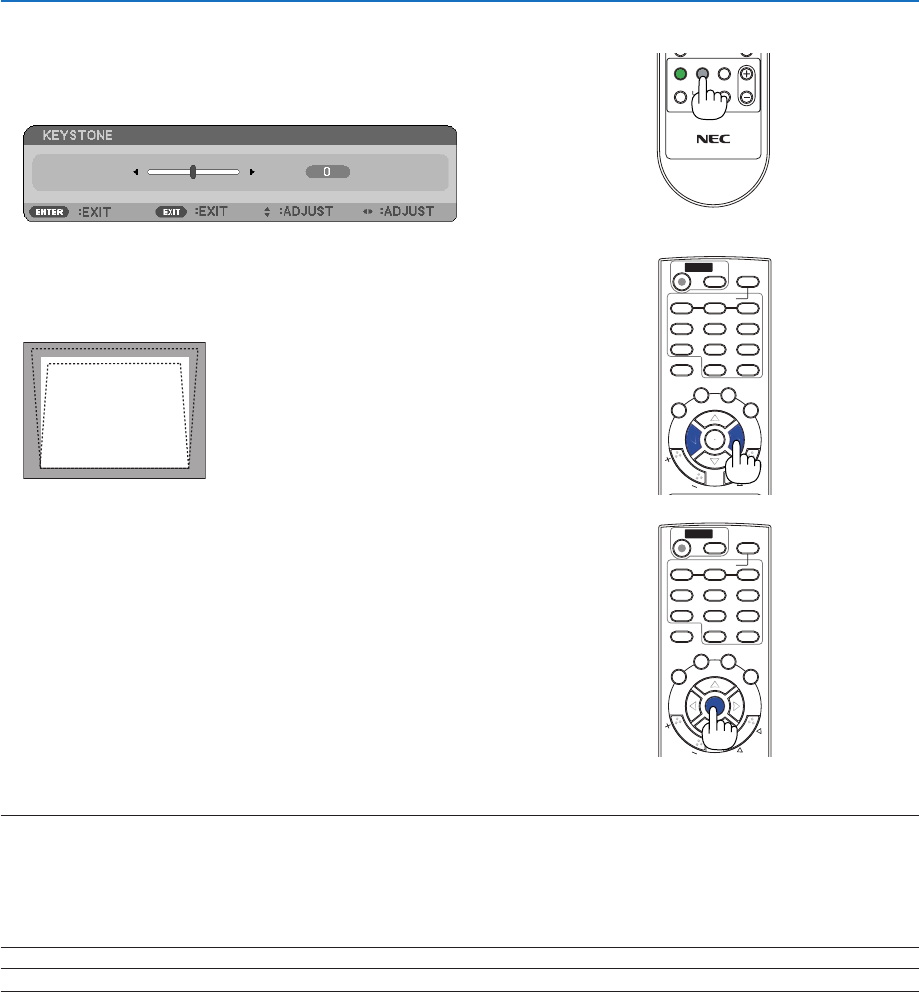
Adjusting with the remote control
1. Press the KEYSTONE button.
The Keystone bar will be displayed.
2. Use the or button to correct the keystone distortion.
Adjust so that the right and left sides are parallel.
3. Press the ENTER button.
NOTE:
• TheKeystonecorrectioncancauseanimagetobeslightlyblurredbecausethecorrectionismadeelectronically.
• Themaximumrangeofverticalkeystonecorrectionis+/−40degrees.Thismaximumrangecanbechangeddependingonthe
signal or aspect ratio setting.
• Therangeofkeystonecorrectionisnotthemaximumtiltangleofprojector.
• Theleftandright(horizontal)keystonecorrectionisnotavailable.
TIP:Thechangescanbesavedwith[KEYSTONESAVE].(→ page 51)
ON
OFF
AUTO ADJ.
COMPUTER
VIDEO
S-VIDEO
VIEWER
ID SET
CLEAR
AV-MUTE FREEZE
ENTER
EXIT
ECO MODE
KEYSTONE
PICTURE
VOL.
HELP
FOCUS
ASPECT
123
456
789
0
MENU
ZOOM
L
-CLICK
R
-CLICK
MOUSE
P
A
G
E
M
A
G
N
I
F
Y
POWER
+
ON
OFF
AUTO ADJ.
COMPUTER
VIDEO
S-VIDEO
VIEWER
ID SET
CLEAR
AV-MUTE FREEZE
ENTER
EXIT
ECO MODE
KEYSTONE
PICTURE
VOL.
HELP
FOCUS
ASPECT
123
456
789
0
MENU
ZOOM
L
-CLICK
R
-CLICK
MOUSE
P
A
G
E
M
A
G
N
I
F
Y
POWER
+
ENTER
ON
OFF
AUTO ADJ.
COMPUTER
VIDEO
S-VIDEO
VIEWER
ID SET
CLEAR
AV-MUTE FREEZE
EXIT
ECO MODE
KEYSTONE
PICTURE
VOL.
HELP
FOCUS
ASPECT
123
456
789
0
MENU
ZOOM
L
-CLICK
R
-CLICK
MOUSE
P
A
G
E
M
A
G
N
I
F
Y
POWER
+