
Electronics America Portable Projector User's Manual


Table Of Contents
- INDEX
- Front cover
- Important Information
- 1. Introduction
- 2. Installation and Connections
- 3. Projecting an Image (Basic Operation)
- 4. Convenient Features
- (1) Turning off the Image and Sound
- (2) Freezing a Picture
- (3) Enlarging a Picture
- (4) Changing Eco Mode
- (5) Checking Energy-Saving Effect [CARBON METER]
- (6) Preventing the Unauthorized Use of the Projector [SECURITY]
- (7) Using the Optional Remote Mouse Receiver (NP01MR)
- (8) Network Setting by Using an HTTP Browser (NP215 only)
- 5. Using On-Screen Menu
- 6. Maintenance
- 7. Appendix
18
3. Projecting an Image (Basic Operation)
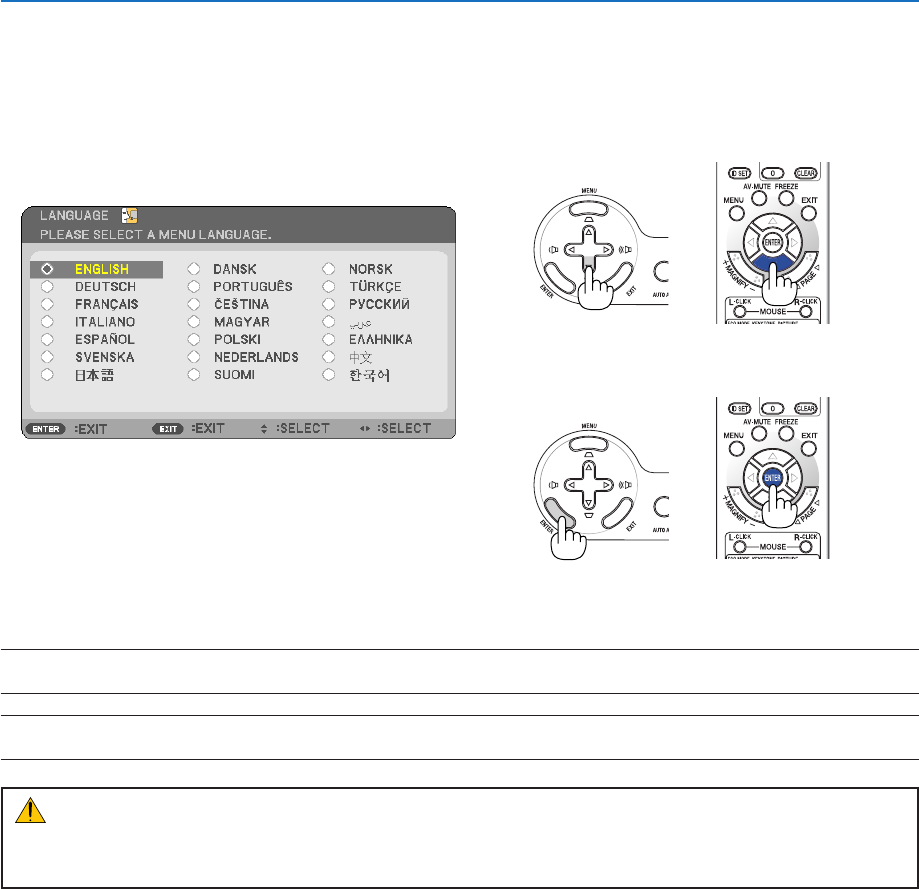
Note on Startup screen (Menu Language Select screen)
When you first turn on the projector, you will get the Startup menu. This menu gives you the opportunity to select one
of the 21 menu languages.
Toselectamenulanguage,followthesesteps:
1. Use the , , or button to select one of the 21
languages from the menu.
2. Press the ENTER button to execute the selection.
After this has been done, you can proceed to the menu
operation.
If you want, you can select the menu language later.
(→[LANGUAGE]onpage41 and 52)
NOTE:Immediatelyafterturningontheprojector,screenickermayoccur.Thisisnormal.Wait3to5minutesuntilthelamplight-
ingisstabilized.
NOTE: If you turn on the projector immediately after the lamp is turned off, the fans run without displaying an image for some time
and then the projector will display the image.
CAUTION:
Theprojectorcannotbeturnedofffor60secondsafterthelampisturnedonandwhilethePOWERindicatorisblinking
green. Doing so could cause premature lamp failure.
Whenthe[ECOMODE]issetto[ON],theLAMPindicatorwilllightgreen.
If one of the following things happens, the projector will not turn on.
• Iftheinternaltemperatureoftheprojectoristoohigh,theprojectordetectsabnormalhightemperature.Inthis
condition the projector will not turn on to protect the internal system. If this happens, wait for the projector’s internal
components to cool down.
• Whenthelampreachesitsendofusablelife,theprojectorwillnotturnon.Ifthishappens,replacethelamp.
• Ifthelampfailstolight,andiftheSTATUSindicatorashesonandoffinacycleofsixtimes,waitafullminuteand
then turn on the power.
+
+