
Electronics America Portable Projector User's Manual


Table Of Contents
- INDEX
- Front cover
- Important Information
- 1. Introduction
- 2. Installation and Connections
- 3. Projecting an Image (Basic Operation)
- 4. Convenient Features
- (1) Turning off the Image and Sound
- (2) Freezing a Picture
- (3) Enlarging a Picture
- (4) Changing Eco Mode
- (5) Checking Energy-Saving Effect [CARBON METER]
- (6) Preventing the Unauthorized Use of the Projector [SECURITY]
- (7) Using the Optional Remote Mouse Receiver (NP01MR)
- (8) Network Setting by Using an HTTP Browser (NP215 only)
- 5. Using On-Screen Menu
- 6. Maintenance
- 7. Appendix
13
2. Installation and Connections
AUDIO IN
LR
AUDIO OUT
L R
Component
YCbCr
COMPUTER IN AUDIO IN
NOTE:RefertoyourDVDplayer'sowner'smanualformoreinformationaboutyourDVDplayer'svideooutputrequirements.
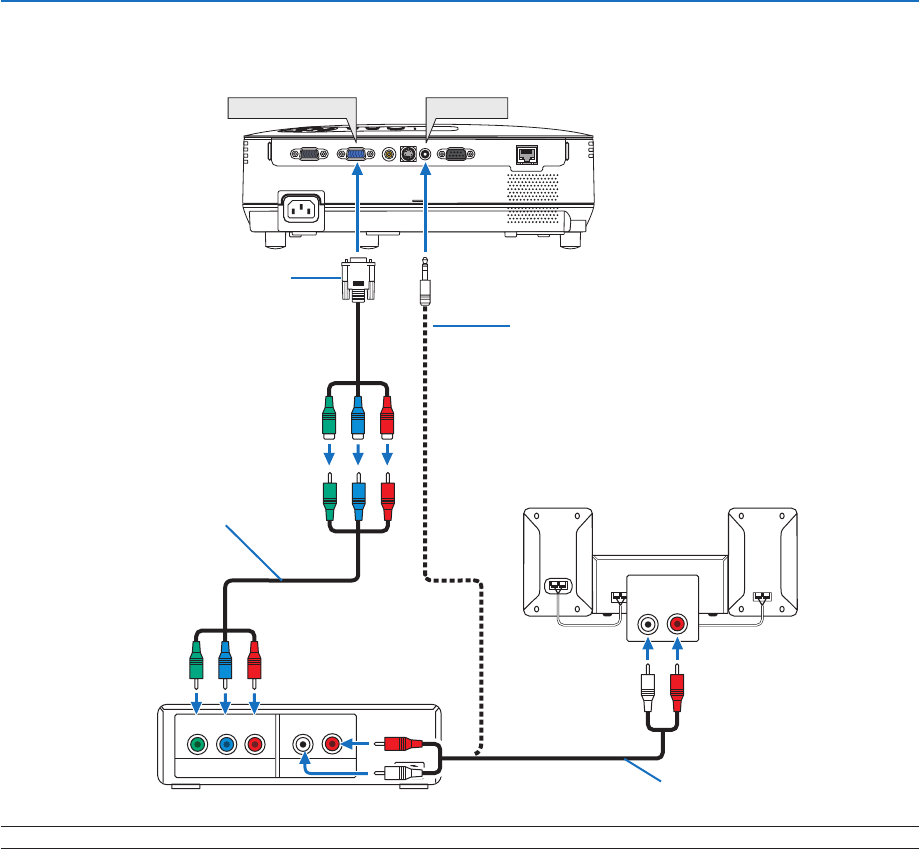
Connecting Your DVD Player with Component Output
DVD player
Audio Equipment
Optional 15-pin - to - RCA (female) ×3
cable (ADP-CV1E)
Component video RCA×3 cable
(not supplied)
Audio cable (not supplied)
Stereo mini plug - to - RCA audio cable
(not supplied)