
Electronics America Portable Projector User's Manual




Table Of Contents
- INDEX
- Front cover
- Important Information
- 1. Introduction
- 2. Installation and Connections
- 3. Projecting an Image (Basic Operation)
- 4. Convenient Features
- (1) Turning off the Image and Sound
- (2) Freezing a Picture
- (3) Enlarging a Picture
- (4) Changing Eco Mode
- (5) Checking Energy-Saving Effect [CARBON METER]
- (6) Preventing the Unauthorized Use of the Projector [SECURITY]
- (7) Using the Optional Remote Mouse Receiver (NP01MR)
- (8) Network Setting by Using an HTTP Browser (NP215 only)
- 5. Using On-Screen Menu
- 6. Maintenance
- 7. Appendix
1
1. Introduction
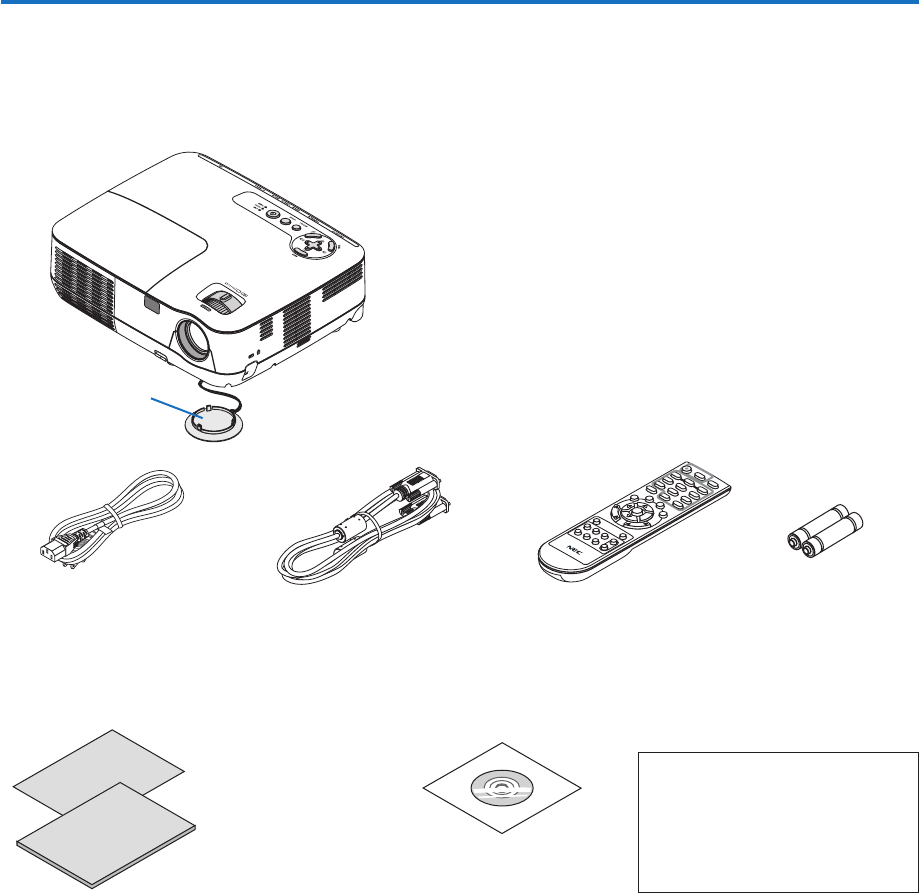
1 What’s in the Box?
Make sure your box contains everything listed. If any pieces are missing, contact your dealer.
Please save the original box and packing materials if you ever need to ship your projector.
Projector
Lens cap
(24F45801)
Power cable
(US: 7N080236)
(EU: 7N080022)
VGA signal cable
(7N520073)
NEC Projector CD-ROM
User’s manual
(7N951371)
For North America only
Registration card
Limitedwarranty
For customers in Europe:
You will nd our current valid Guarantee
PolicyonourWebSite:
www.nec-display-solutions.com
Quick Setup Guide
(7N8P9791)
Important Infomation
(For North America: 7N8P9801)
(For Other countries than North
America: 7N8P9801 and 7N8P9811)
Remote control
(7N900881)
Batteries (AAAx2)