
Electronics America Switch Reference Guide


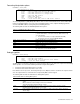


Table Of Contents
- SmartPanel
- Browser-based interface
- Command Line Interface
- Introduction
- Information Menu
- Introduction
- Menu overview
- System Information Menu
- SNMPv3 Information Menu
- System information
- Show last 100 syslog messages
- System user information
- Layer 2 information
- FDB information menu
- Trunk group information
- Layer 3 information
- ARP information
- IP information
- IGMP multicast group information
- IGMP multicast router port information
- Link status information
- Port information
- Group information
- Information dump
- Statistics Menu
- Configuration Menu
- Introduction
- System configuration
- System host log configuration
- Secure Shell Server configuration
- RADIUS server configuration
- TACACS+ server configuration
- NTP server configuration
- System SNMP configuration
- SNMPv3 configuration
- SNMPv3 User Security Model configuration
- SNMPv3 View configuration
- SNMPv3 View-based Access Control Model configuration
- SNMPv3 Group configuration
- SNMPv3 Community Table configuration
- SNMPv3 Target Address Table configuration
- SNMPv3 Target Parameters Table configuration
- SNMPv3 Notify Table configuration
- System Access configuration
- Port configuration
- Spare Ports Group configuration
- Group configuration
- Configuration Dump
- Saving the active switch configuration
- Restoring the active switch configuration
- Operations Menu
- Boot Options Menu
- Maintenance Menu

Command Line Interface 85
Resetting the switch
You can reset the switch to make your software image file and configuration block changes occur.
Resetting the switch causes the Spanning Tree Protocol to restart. This process can be lengthy, depending on the
topology of your network.
To reset the switch, at the Boot Options# prompt, enter:
>> Boot Options# reset
You are prompted to confirm your request.
Current switch software information
To display the current switch software information, enter the following.
>> Boot Options# cur
Currently set to boot software image2, factory default config block.
Current FLASH software:
image1: version 1.2.0, downloaded 0:15:51 Mon Jan 2, 2006
NormalPanel
image2: version 1.0.0, downloaded 1:32:08 Sun Jan 8, 2006
SmartPanel
boot kernel: version 1.2.0
Use this command to display the image running on the switch, the Configuration block which the switch runs after
booted, and the switch software stored in image1 and image2.
When NormalPanel is displayed in the software information, the software for conventional Layer2 switch mode is
stored in the image. When SmartPanel is displayed, the software for SmartPanel mode is stored in the image.