
Server User's Guide




Installing and Using Utilities 5-71
Procedure of Update from ft server utility
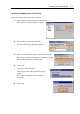
Update the firmware in the procedure as follows:
1. Click the [Firmware] button in the [Firmware] tree.
The [BMC FW Update] dialog box appears.
2. Enter the device name and click [OK].
The [Execution Check] dialog box appears.
3. Store the firmware in the directory shown in [Location].
The storage area may be changed. See "Change of Update
Data Storage Destination" described later.
4. Click [OK].
Execute the firmware update.
The progress of the update appears during the
update.
The update result appears after the update is
terminated.
5. Click [OK].