
user manual





Reference D - 1
Console Shortcut Keys
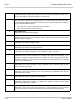
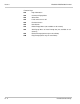
These keys jump to a console screen:
-
A
pplication Screen
- Personal
D
irectory Screen
-
G
roups Screen
-
T
ransaction Directory Screen
- Voice
P
rompt Editor Screen
-
S
witch Setup Screen
These keys move between
pages
of a particular screen (pages are listed
alphabetically by subscriber, box, or group):
Move to the previous page.
Move to the next page.
Displays the first person, box, or group in a directory.
Displays the last person, box, or group in a directory.
- Jumps to a subscriber, box, or group. When prompted for the name
to jump to, enter the first few characters of the last name, and
press . At the Voice Prompt Editor Screen, you can also
press - to jump to a prompt number.
These keys move the cursor between
fields
on a page:
Move cursor one field
to the right.
- Move cursor one field to
the left.
Move cursor to the closest field above.
Move cursor to the closest field below.
Move cursor to the next field.
Each key also saves any changes you made to the current field. Press if
you do not want to save the changes you made in the current field.