
user manual





Reference C - 1
Call Transfer Options
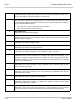
A
Announce
The person who answers the telephone hears a beep before
being connected to the caller. This lets the operator know
exactly when the call is being connected or that a call is an
outside call.
C
Confirm
Before a call is transferred, the person who answers the
telephone can choose whether or not to take the call. If the call
is refused, the system returns to the caller to play the
applicable greeting and take an action (typically take
message).
D
Dialtone Detection
The voice mail system checks for dial tone before the call is
transferred. For this transfer option to work, you must also use
the DT integration option. For details, refer to
Chapter 21
Switch Setup
.
I
Introduce
The person who answers the telephone hears
“Call for
<name>”
before being connected to the caller. Use this when
several people share the same telephone.
M
Message Screen
Callers are asked to record their name. Before the call is
transferred, the person who answers the telephone hears
“Call
from <recorded name>.”
If the caller leaves a message
instead, the recorded name is added to the start of the
message. Even if the caller does not leave a message, the
recorded name is still left as a message box message. Do not
use with the
S
call transfer option.
S
Screen
Callers are asked to record their name. Before the call is
transferred, the person who answers the telephone hears
“Call
from <recorded name>.”
The recorded name is
not
saved. Do
not use with the
M
call transfer option.