
user manual





EliteMail VMS/EliteMail Limited Issue 3
Console Maintenance 2 - 3
S
ECTION
3
S
ET
U
P
R
EMOTE
S
OFTWARE
Before using the remote software, set up the online telephone book. To
do this, set up a default telephone book entry. After setting the default,
add the rest of the telephone Book entries (one for each host computer
you plan to access). To make adding entries faster, the default settings
are automatically copied to each new telephone book entry for you. All
you have to add is the host computer name and telephone number.
3.1 Set the Default Telephone Book Entry
To ensure the default settings are correct:
1. At the DOS prompt, run the Remote Maintenance software.
Change to the root directory of the C: drive (or the drive
where you installed the software). Enter RR, and press
. A Banner Screen is displayed briefly, then the DOS
prompt is displayed again.
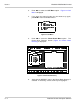
2. Press - . (The right Shift key does not work for
this). The Main Menu (Figure 2-1 Main Menu) is displayed.
Figure 2-1 Main Menu