
user manual





20 - 14 Subscribers
Issue 3 EliteMail VMS/EliteMail Limited
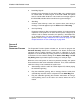
Figure 20-7 Enabling the Internal Greeting Option
When
Int
is
Yes
, subscribers are asked if they want to record an internal
greeting during the enrollment conversation.
On the Personal Directory Screen, the
Greeting
section of the Expanded
Transfer Options window displays information about each subscriber
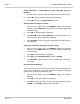
greetings. Refer to Figure 20-8 Subscriber Personal Greetings Fields.
Figure 20-8 Subscriber Personal Greetings Fields
Std / Int / Alt
These voice fields are for the standard, internal, and alternate
greetings. The system indicates the greeting currently being used
with
>>
. If a field displays
0:00
, no greeting is recorded and the
subscriber uses the system default standard and alternate greetings.
You can use a local connection to record a subscriber greeting. For
details, refer to Chapter 15 Recording Voice Fields.