
user manual



20 - 6 Subscribers
Issue 3 EliteMail VMS/EliteMail Limited
#1 - #4
Lines 1 through 4 each set a message delivery telephone number,
schedule, and delivery method. Subscribers can also change
message delivery telephone numbers, schedules, or delivery
methods by telephone.
For details, refer to Chapter 9 Section 13 Message Waiting Lamps
on page 9-54.
S
ECTION
4
A
CCESS
C
ODES
W
INDOW
You can use a special Access Code Options window to set access codes
for an individual subscriber, or to set the default codes for each new
subscriber added to the system.
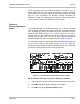
To view the Access Code Options window for a subscriber, press - ,
then press at the subscriber Personal Directory page. Refer to
Figure 20-3 Access Code Options Window for a Subscriber.
Figure 20-3 Access Code Options Window for a Subscriber
To view the Access Code Options for each new subscriber added to the
system, press - , then press at Application screen Page 5.
The Access Code Options window gives a brief description of each access
code. To select and remove codes for a subscriber, highlight the code
checkbox and press . To move through the codes, Press ,
- , , , , or . As you move the cursor through the list of
codes, the one-line help at the bottom of the screen displays a longer
description of each code.