
user manual



EliteMail VMS/EliteMail Limited Issue 3
Reference 19 - 3
If your organization uses the first-time enrollment conversation, you can
further protect the voice mail system by limiting the number of unused
voice mailboxes on the system. Check the Personal Directory frequently to
find out if new subscribers are promptly enrolling themselves by
telephone. Contact any subscribers not yet enrolled, and encourage them
to do so. Delete unused voice mailboxes from the system.
S
ECTION
4
F
ORGOTTEN
S
ECURITY
C
ODES
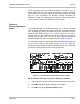
The System Manager is not allowed to view, set, or change a security
code for another subscriber. The system indicates if a security code is set
by a subscriber by placing the letters SC on the subscriber Personal
Directory page. Refer to Figure 19-1 Personal Directory Page with a
Security Code Set. The system also records all incidents of an incorrectly
entered security code in the Call Log to alert a System Manager of
possible unauthorized callers. For details refer to Chapter 16 Reports.
If a subscriber forgets the security code, the System Manager cannot look
up the security code on any system screen, but he can delete the
subscriber security code at the Personal Directory Screen. The subscriber
should then call the system and set a new security code.
Figure 19-1 Personal Directory Page with a Security Code Set
See if subscriber has a security code or delete it by telephone
1. Call the system and sign in with your Personal ID and security code.
2. Press to skip to the System Manager conversation.
3. Press to skip to the
operator mailbox
options.