
user manual





18 - 26 Screens
Issue 3 EliteMail VMS/EliteMail Limited
S
ECTION
14
T
RANSACTION
D
IRECTORY
S
CREEN
Use the Transaction Directory to create transaction boxes and interview
boxes that are the building blocks for special applications using special call
routing, audiotext, information menus, directories, and interviews. You can
also set up special voice detect applications for callers who want to speak
their answers, instead of pressing touchtones.
Each transaction box, interview box, and voice detect box in the system
has one page in the Transaction Directory. The Transaction Directory can
be sorted by box name or System ID. The fields on these screens are
described in detail in Chapter 24 Transaction Boxes, Chapter 6 Interview
Boxes, Chapter 14 Public Interview Box and Public Messages, and
Chapter 25 Voice Detect.
Transaction Boxes
Transaction boxes let you set up special call routing and audiotext
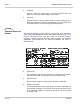
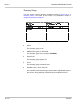
applications. Refer to Figure 18-19 Transaction Box Screen.
Figure 18-19 Transaction Box Screen
Name
The transaction box spelled name.
Transaction box of
The transaction box owner.
Voice name
The transaction box recorded name.
Schedule #
Schedule the box follows (1, 2, 3 or 4). If blank, the transaction box
follows the schedule for the port the call came in on. For details, refer
to Chapter 17 Schedules.