
user manual





EliteMail VMS/EliteMail Limited Issue 3
Reference 18 - 23
S
ECTION
13
G
ROUPS
S
CREEN
Use the Groups Screen to set up message groups, directory groups, and
directory menus.
Message Group
Use a message group to send the same message to several subscribers
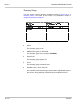
at once. Refer to Figure 18-16 A Message Group For details, refer to
Chapter 9 Section 7 Message Groups on page 9-18.
Figure 18-16 A Message Group
Name
The message group spelled name or group number.
Voice
The message group recorded name.
Open Group of or Private Group of
The name of the message group owner.
Dispatch
When
Yes
, the first person in the group who listens to a message is
the only person who receives it.
Member name
Lists the last and first names of each message group member in
alphabetical order.
Last contacted
Shows the date and time a group member last listened to a group
message.