
user manual





18 - 20 Screens
Issue 3 EliteMail VMS/EliteMail Limited
Max-msg
Sets the time in seconds (Maximum 9999) messages from outside
callers can last. This field applies only if the Action field is
Take-msg. Refer to Chapter 9 Section 12 Take a Message on page
9-45.
Edits OK?
Controls whether or not outside callers are asked if they want to add
to, listen to, or record their message again. This field applies only if
the
Action
field is
Take-msg
. For details, refer to Chapter 9 Section 12
Take a Message on page 9-45.
Lamp # / Activate Lamps?
Controls message waiting lamps for the subscriber. For details, refer
to Chapter 9 Section 13 Message Waiting Lamps on page 9-54.
On Now?
Tells you whether or not the voice mail system thinks the subscriber
message waiting lamp is on now.
#1 - #4
Lines 1 through 4 in the lower part of the screen each set a message
delivery telephone number, schedule, and delivery method for up to 4
telephone numbers. Refer to Chapter 9 Section 5 Message Delivery
on page 9-9.
S
ECTION
10
A
CCESS
C
ODE
O
PTIONS
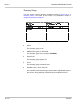
Press - , then press to view a help screen for selecting access
codes. Press , - , , ,[ , or to highlight the checkbox
to the left of a code description. Press to add or remove a code.
Refer to Chapter 20 Subscribers Section 5 Expanded Transfer Options
Window on page 20-7 for a description of each code.
Figure 18-13 Access Code Options Window