
user manual




Reference 17 - 1
Schedules
Most offices are not open around the clock. You can configure the voice mail
system to handle calls differently during the hours your company is closed.
You define for the system the hours and days of the week your office is open
for business. You can also specify holidays when your office is closed.
This chapter describes how to set the system schedules and how they affect
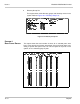
the system Day and Night Modes of operation. Refer to Figure 17-1
Application Screen Page 4.
Figure 17-1 Application Screen Page 4
Use Toolkit to schedule unattended backups and disk optimization. For
details, refer to Chapter 26 Back Up and Restore.
To bypass Toolkit to schedule other processes, use the
DOS Surrender
fields
(Application screen Page 6) and the daily, weekly, and monthly batch files.
S
ECTION
1
D
AY
AND
N
IGHT
M
ODES
You can configure the system for Day Mode or Night Mode. You define the
hours and days when your office is open as Day Mode. When your office is
closed, the system operates in Night Mode. Day Mode hours do not have to be
normal daylight hours. Day Mode hours are the business hours when standard
telephone service is available.