
user manual






11 - 6 Opening Greeting
Issue 3 EliteMail VMS/EliteMail Limited
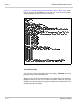
Figure 11-4 Sample Music-on-Hold Prompts Used in Quick Play shows
how to change the AVPRMPT file so that the music-on-hold prompts
(holding prompts 23-32) are used in Quick Play.
Turn Off Quick Play
You can turn off the Quick Play feature by setting
QP=NONE
for every
prompt set listed in the AVPRMPT file.
When you turn off the Quick Play feature, the system does not create the
QP.IDX file when you turn on or restart the system. Instead of using the
QP.IDX file to play prompts, the system searches the hard disk for each
individual prompt as needed.
Figure 11-4 Sample Music-on-Hold Prompts Used in Quick Play