
user manual




EliteMail VMS/EliteMail Limited Issue 3
Reference 9 - 55
Activate Lamps?
Enter Yes to turn on the message waiting lamp function for an
individual subscriber.
On Now?
This field indicates the current state of the subscriber message
waiting lamp. It can be changed manually when you are testing or
resetting message waiting lamps.
Set Fields for Message Waiting Lamps System-Wide
Message waiting lamp fields that apply to all subscribers are entered at the
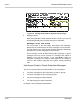
top of Switch Setup Screen Page 2. Refer to Figure 9-20 System-Wide
Message Waiting Lamp Fields.
Figure 9-20 System-Wide Message Waiting Lamp Fields
These fields are automatically filled in when you enter the NEC switch on
Line 1 of Switch Setup Screen Page 1. For details, refer to Chapter 21
Switch Setup.
Message Lamp On:
Use this field to set the code sent to the subscriber telephone to turn
on the message waiting lamp. For EliteMail, X indicates the
extension number.
Off:
Use this field to set the code sent to the subscriber telephone to turn
off the X code.