
user manual




9 - 54 Messages
Issue 3 EliteMail VMS/EliteMail Limited
Chapter 11 Opening Greeting
Chapter 20 Subscribers
Appendix B Action Codes
S
ECTION
13
M
ESSAGE
W
AITING
L
AMPS
The voice mail system can alert subscribers with new messages by turning
on a message waiting indicator on the telephone. This eliminates the need
to repeatedly check with the system to see if any new messages are
received. Usually, this indicator is a message waiting lamp or LED
message. For simplicity, all message waiting indicators are called
message waiting lamps.
This section describes message waiting lamps and the fields that affect
them.
You can also set the system to deliver messages by dialing an extension or
external telephone number. For details, refer to Section 5 Message Delivery
on page 9-9.
Set Fields for Subscriber Message Waiting Lamp
Message waiting lamp fields are in the
Message Notification
section of
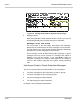
the Personal Directory pages. Refer to Figure 9-19 Message Waiting
Lamp Fields for Subscriber.
Figure 9-19 Message Waiting Lamp Fields for Subscriber
Lamp
#
This is the extension number the system dials when attempting to
turn a message waiting lamp on or off.
X
in this field indicates the
extension ID listed on the screen.