
user manual




9 - 52 Messages
Issue 3 EliteMail VMS/EliteMail Limited
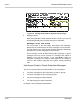
Figure 9-17 Message-Taking Fields on Application Screen Page 5
Message Counts
When the Expanded Transfer Options window is closed, you can see
the following display-only message counts for a subscriber.
New Msgs: 0 =0:00 Total: 0 =0:00
The first number in the New Msgs: field shows new messages,
followed by the combined time of these messages in hours:minutes.
The first number in the Total: field shows total messages, followed by
the total time of all the messages in hours:minutes.
These message counts do
not
include public messages or group
messages and may not be accurate if a message was added or
deleted in the last five minutes. If you press to delete all
subscriber messages, the counts in these fields do not change to
zero for a few minutes, especially if the system is busy processing
calls.
Use Access Codes to Control Subscriber Messages
You can use access codes to control whether or not a subscriber:
can leave messages for other subscribers, guests, or groups
can leave messages for open message groups
can mark messages for special delivery
can edit messages to other subscribers.
For details, refer to Chapter 20 Subscribers.