
user manual




EliteMail VMS/EliteMail Limited Issue 3
Reference 9 - 49
Beep on Record?
When this field is Yes, the system plays a beep after requesting a
caller to leave a message to tell the caller when to begin speaking.
Disk full warning at mins left
Use this field to control when the system warns subscribers that disk
space on the voice mail system is getting low. When the message
storage available on the system is equal to or less than the number
of minutes specified in this field, subscribers are asked to delete any
unnecessary messages when they call the system.
Set Subscriber Message Fields
Message-taking fields that affect the message life cycle (the time allowed
for an outside caller message, whether or not outside callers can edit
messages, whether or not messages should be marked urgent, or what to
do after taking a message) can be set for individual subscribers.
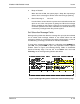
To view all the message-taking fields for a subscriber, press - , then
press , and press to open the Expanded Transfer Options
window. Refer to Figure 9-16 Message-Taking Fields on Subscriber
Personal Directory Page. The first line in the Action area must read
Take-msg for the message-taking fields to take effect.
.
Figure 9-16 Message-Taking Fields on Subscriber Personal Directory Page