
user manual




9 - 46 Messages
Issue 3 EliteMail VMS/EliteMail Limited
If the Action field is Take-msg, the system takes a message from any
caller who is routed to the box and passes through the Transfer and
Greeting sections of the sequence. For example, if call transfer is active
for a subscriber, the voice mail system first tries to transfer a call to the
telephone number listed. If the line is busy or unanswered, the system
plays the applicable greeting, then takes a message.
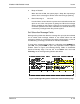
Figure 9-14 Message Taking Fields on Subscriber Page
When setting subscriber or other box message-taking fields, you should
consider the flow of a call through this entire Transfer→Greeting→Action
structure. The greetings and one key dialing features in particular may be
used for special applications, such as telling a caller the type of message
to leave, routing a caller to a personal secretary, or allowing a caller to
page the subscriber or try another extension instead of leaving a message.
System-Wide Message Fields
System-wide fields control message taking and affect all messages,
including those left by subscribers. They are configured on Application
screen Page 6. Refer to Figure 9-15 Message-Taking Fields on
Application Screen Page 6.