
user manual




ND-45504 (E) CHAPTER 4
Page 81
Revision 2.0
PN-ME00 (EXTMEM)
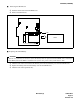
■ Removing the SRAM Card
➀ Push the card slot bar of the PN-ME00 card.
➁ Remove the SRAM card.
Removing the SRAM Card
■ Replacing the SRAM Battery
➀ Slide the lock switch downward (Lock Release), then remove the battery case from the SRAM card.
➁ Replace the battery, then insert the battery case into the SRAM card.
➂ Slide the lock switch upward (Lock).
CAUTION
To prevent loss of memory on an active system, the battery must be replaced when the SRAM card is installed on
the PN-ME00, and the PN-ME00 is installed in the system. Also, power to the system must be “ON”.
SRAM
PUSH
PN-ME00