
Server User's Guide



Understanding the Active Upgrade Console Interface
2-28 Express5800/320Fc: Active Upgrade™ User’s Guide
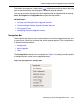
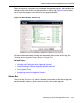
Figure 2-10. Status Bar
For more information about interpreting items in the status bar, see “Viewing Active
Upgrade Process Status” on page 4-21.
Related Topics
• “Starting and Exiting the Active Upgrade Console”
• “Understanding the Active Upgrade Console Interface”
• “Pre-Upgrade Tasks”
• Configuring the Active Upgrade Process
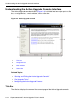
1 Configuration file name 4 Operational State
2 Hardware State 5 Partner State
3 Upgrade State