
Extra Information


28
My Media
My Media is not available for all models.
My Media is a NavDesk application allowing you to import music (.wav, .mp3, .wma) and video files from your
computer to your Navman.
Before you begin, ensure your Navman is correctly plugged into your computer: Plug the large end of the USB
cable directly into a USB port on your computer (not a USB hub); plug the small end into on the side of your
Navman.
NavDesk
My Media
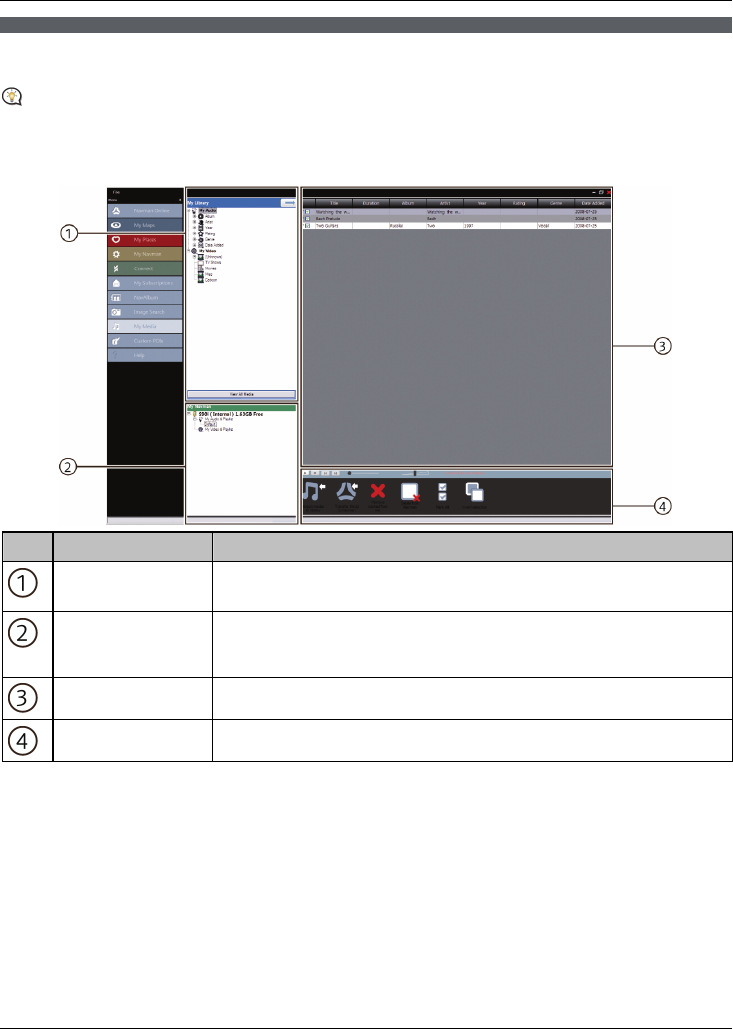
Element Description
My Library Displays a list of music files stored in the library on your computer.
Click a field to display its contents in the Music display area.
My Navman Displays a list of folders containing playlists stored on the Navman internal
memory and memory card.
Click a folder to display its contents in the Music display area.
Music display area Displays music file from the selected folder
Toolbar When a music file is selected, the icons that can be used will be available.
How do I import a music file to my NavDesk library?
1. From the Toolbar section select Import media to library.
The Open dialog box will display.
2. Navigate and select a music file you want to transfer.
3. Click Open.
The selected music file is imported and can be viewed in the display area.
4. Repeat steps 1-3 to transfer more music files.