
Operation Manual






Navman N-Series | How do I go from A to B?
34
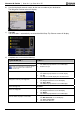
b) Use the Keyboard screen to search for the house number of your destination.
The Waypoint Preview screen will display.
c) Tap Add.
The destination is automatically saved and the Multi-Stop-Trip Planner screen will display.
d) Complete one or more of the following:
If you want to ... Then ...
add another waypoint
Waypoints added after a multi-stop trip has
commenced will not be included in the
current route.
tap Add.
The Multi-stop Trip Planner screen will display.
Return to step 3.
calculate the route
tap Go.
The Multi-stop Trip Preview screen will display.
Tap Go.
The Map screen will display the calculated route.
change the order of your waypoints
tap a destination point to move.
The Waypoint Preview screen will display.
Tap Up or Down.
The Multi-stop Trip Planner screen will display.
delete all waypoints tap Clear.
delete one waypoint
tap a destination point to delete.
The Waypoint Preview screen will display.
Tap Delete.
The Multi-stop Trip Planner screen will display.
save the multi-stop trip as a Favourite
tap Save.
The New Favourite screen will display.
Tap Save as Favourite.
The Favourite will save.