
User guide


Table Of Contents
- SAFETY PRECAUTIONS
- I. Unit & Remote Control Hardware
- II. Basic Operations
- III. Advanced Operations
- IV. Troubleshooting
- V. Technical Specifications
Unit & Remote Control Hardware
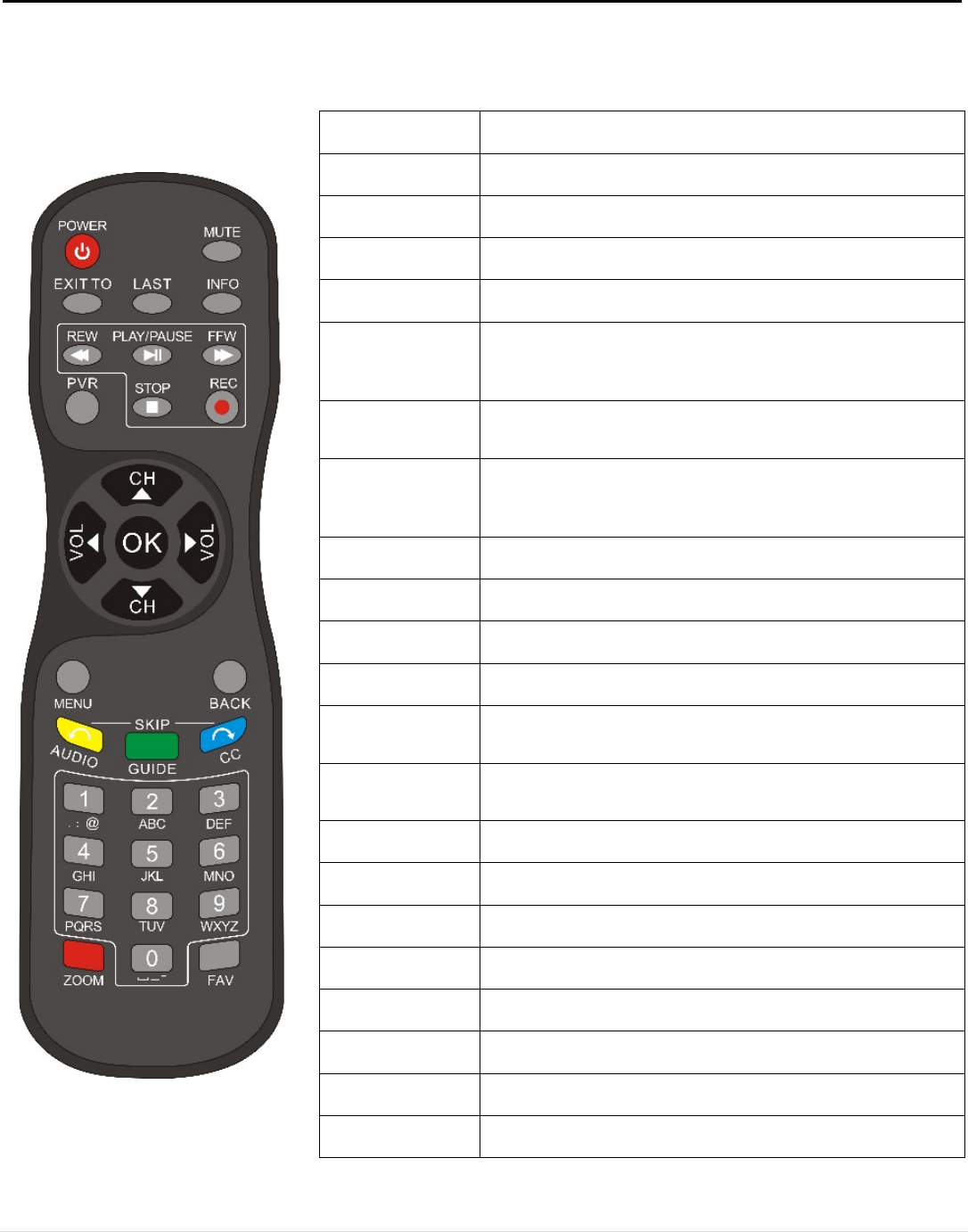
3. Remote Control
[POWER] Switches unit between On and Standby mode
[MUTE] Mutes or unmutes audio output
[EXIT TO] Exits to live TV while in a menu
[LAST] Toggles between the previously selected and current channels
[INFO] Shows the information and parameters of the current channel
[REW ◄◄]
Rewinds the current program
Also cycles through speeds of x2, x4, x8, x16, and x24 while
rewinding
[PLAY/PAUSE ►II]
Pauses or plays the current program
Activates Timeshift for live TV
[FFW ►►]
Fast-forwards the current program.
Also cycles through speeds of x2, x4, x8, x16, and x24 while fast-
forwarding
[STOP ■] Stops recording, playback, or Timeshift.
[REC ●] Starts recording current channel
[PVR] Opens the Personal Video Recorder (PVR) menu
[CH ▲/▼] Moves the highlight bar or changes channel up/down
[VOL ◄/►]
Moves the highlight bar or changes volume left/right
Also jumps forward or backward in the current program
[OK]
Selects a program, highlight line, or parameter value. Also
shows the channel list while watching TV
[MENU] Used to display the Main Menu or return to the previous menu
[BACK] Return to the previous menu
[Yellow/AUDIO] Opens the Audio Mode window
[Green/GUIDE] Opens the Electronic Program Guide (EPG) window
[Blue/CC] Opens the Closed Captioning window
Numeric keypad Inputs numbers and letters
[Red/ZOOM] Select aspect ratio (Auto, 4:3 Letterbox, 4:3 Pan & Scan, 16:9)
[FAV] Opens the Favorites window
5 | Page