
MFX-2500 Multi-function Machine Operating Instructions General Reference



Just in case …
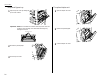
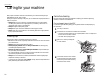
The optional Bypass tray
1
Open the printer cover by holding the
printer cover release.
Important: Never touch the electrical contacts inside the printer cover and
under the drum cartridge, as an electrostatic discharge may
damage the machine.
2
Remove the jammed paper.
3
Close the printer cover.
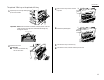
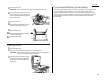
The optional duplex unit
1
Open the duplex unit cover.
2
Remove the jammed paper.
3
Close the duplex unit cover.
Electrical Contacts
2.4