
User`s guide




3-29network confiGuration
1
2
3
4
5
6
7
8
9
10
11
12
13
AI
uSinG the oPtion tooLS
4
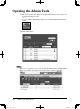
Select either “Personal” or “Shared”.
5
Click [Add].
The “Folder Shortcut Settings” dialog appears.
Items Descriptions
Shortcut Name Enter the folder shortcut name.
Folder Path Enter the exact folder path.
Folder Browse If you do not know the exact folder path, select [Browse]
to browse the network.
User Name If the folder requires authentication, please enter the
user name.
If your machine is on a windows domain controlled
network, add the domain name after the user name with
an “@”, like “sam@dom_muratec.com”.
Password If the folder requires authentication, please enter the
user password.
Automatic Network
Login
Select “On” or “Off”
On: The authentication will be done automatically,
when the User Name and Password are registered.
Off: The User Name and Password will be required
every time to access the folder.
6
Configure the settings, then click [Save].
PC_Users_Guide.indb 29 2007/04/27 10:17:55