User`s guide
Manuals
Brands
Muratec Manuals
Printer
F-565
91
92
93
94
95
96
97
98
99
100
3-27
S
etuP
1
2
3
4
5
6
7
8
9
10
11
12
13
AI
u
SinG
the
o
Ption
t
ooLS
Deleting a
categor
y name
1
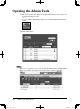
Repeat steps 1 through 3 in “Register or edit category name”.
2
Select category name you want to delete.
3
Click [Initialize] to delete the category name.
PC_Users_Guide.indb 27
2007/04/27 10:17:54
1
...
...
89
90
91
92
93
...
...
204