
User`s guide






2-19uSinG officebridGe functionS
1
2
3
4
5
6
7
8
9
10
11
12
uSinG officebridGe
13
AI
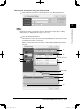
Reviewing or canceling destinations
You can review, cancel or change the destinations.
NOTE
This function is only available prior to sending the documents.
1
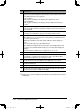
Click [Address book] either in “Fax Destination” or in “E-mail Destination”.
2
Review the entered destinations in the lower area of the screen. Click [FAX]
and [I-FAX] to switch the screen between fax destinations and e-mail destina-
tions.
3
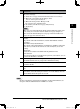
To cancel destinations, check the box next to the name and click [Delete].
4
Click [Save] to close the screen with the selected destinations ready for trans-
mission.
PC_Users_Guide.indb 19 2007/04/27 10:17:46