
User`s guide






2-17uSinG officebridGe functionS
1
2
3
4
5
6
7
8
9
10
11
12
uSinG officebridGe
13
AI
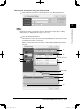
Searching for a destination
NOTE
In order to search an LDAP server, the server must be registered in advance. Con-
tact your system administrator. For more information on server set up, see “LDAP
Settings” on page 4-42.
1
When the “Address Book” screen appears (see page 2-15), click [Search].
2
Enter the search information.
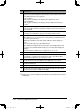
Descriptions
A
Select the server that contains the destination. Usually, you do not need to
change the server. If you are not sure about it, ask your system administrator.
B • Name
Enter the name or part of a name to be searched.
• Fax
Enter the fax number or a part of the fax number to be searched.
• E-mail
Enter part of the e-mail address to be searched.
• Department
This is not an independent field. To use this field either the Name, Fax
or e-mail should also be entered.
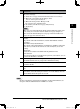
C • Any
Searches any information in this field, including “blanks”.
• Initial
Searches for contacts that begin with the characters entered in this
field.
• Final
Searches for contacts that end with the characters entered in this field.
• Equal
Searches for contacts that match exactly with the information entered
in this field.
• Not Use
Information in this field (including blanks) will not be used for searching.
D • AND
Searches for contacts that meet all the entered criteria.
• OR
Searches for contacts that meet any of the entered criteria.
C
A
D
B
PC_Users_Guide.indb 17 2007/04/27 10:17:46