
User`s guide






2-15uSinG officebridGe functionS
1
2
3
4
5
6
7
8
9
10
11
12
uSinG officebridGe
13
AI
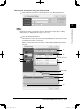
Entering the destinations using the Address Book
1
Click [Address book] either in “Fax Destination” or in “E-mail Destination”.
NOTE
Destinations must be registered in advance. For details on registering or editing
destinations, see “Address Book” on pages 3-5 to 3-11.
2
Select the desired destinations.
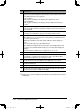
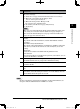
Check the boxes next to the names and click [Add]. Refer to the reference table
for information on these various tabs.
When you check the box next to “Name”, all the displayed destinations will be
selected.
B
A
G
F
C
H
E
I
J
(1) Check the boxes
(2) Click [Add]
D
PC_Users_Guide.indb 15 2007/04/27 10:17:45