
User`s guide






2-14 uSinG officebridGe functionS
4
Specify the destinations.
• To enter them directly, see below.
• To select them from the Address Book, see page 2-15.
• To locate them using an LDAP search, see page 2-17.
5
Adjust any settings.
• To adjust settings, see
“Setting transmission functions” on page 2-20.
6
Click [Send].
To review or cancel the selected documents, see “Reviewing or canceling desti-
nations” on page 2-19.
NOTE
When you have installed and set up the “Muratec OB InfoMonitor” on your PC, you
can be notified of the transmission status automatically. See page 5-3, how to set it
up.
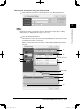
Entering destinations
Entering the destinations directly
1
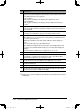
Enter the fax number in the “Fax Destination” box.
2
Click [Add].
3
Repeat steps 1 and 2 until you have entered all of the fax destinations.
4
Enter the e-mail address in the “E-mail Destination” box.
5
Click [Add].
6
Repeat steps 4 and 5 until you have entered all of the destinations.
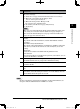
You may change the recipient status to “To” to “Cc” or “Bcc” from the drop-down
list.
7
To review the entered destinations, click the drop-down list to the right of the
[Add] button.
PC_Users_Guide.indb 14 2007/04/27 10:17:45