
User`s guide






2-13uSinG officebridGe functionS
1
2
3
4
5
6
7
8
9
10
11
12
uSinG officebridGe
13
AI
PC fax transmission and reception
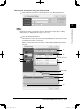
Here we explain how to send or forward documents from the OfficeBridge list.
When you set up the “Forward Settings” or “Received Fax Forwarding”, you can
receive faxes and e-mails in the Public Inbox or in a Personal Inbox.
Sending documents from an OfficeBridge list
1
Start OfficeBridge and log in. (See page 2-11)
2
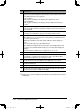
Select the file you want to send by checking the box next to the file.
When you are going to send a file from Temporary Storage or send only a cover
page, do not make a selection. See “Setting transmission functions” on page 2-
20 how to send them.
3
Click [Send].
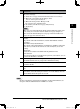
The “Fax Transmission Settings” dialog will appear.
PC_Users_Guide.indb 13 2007/04/27 10:17:45