
User`s guide




1-19inStaLLinG officebridGe on your Pc
1
2
3
4
5
6
7
8
9
10
11
GettinG Started
12
13
AI
19
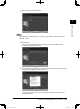
When installation is complete, the completion wizard will appear.
20
Select “Yes, I want to restart my computer now.” and click [Finish].
21
See Chapter 5 “Using the Utility Programs” to set up the utility programs.
For Windows Vista, Windows XP SP2 and Windows Server 2003 users
On Windows Vista, Windows XP Service Pack 2 or Windows Server 2003, the “Win-
dows Security Alert” dialog will be displayed when programs such as InfoMonitor
and Scan to Print Monitor or drivers such as TWAIN Connector initially start.
(Windows Vista) (Windows XP SP2)
PC_Users_Guide.indb 19 2007/04/27 10:17:42