
User`s guide




1-17inStaLLinG officebridGe on your Pc
1
2
3
4
5
6
7
8
9
10
11
GettinG Started
12
13
AI
11
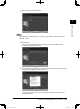
After entering the IP address, click [OK].
12
Specify which program folder you want to use when launching programs from
the “Start” menu.
To specify another folder, enter the folder name in the “Program Folder” box.
To use a pre-existing program folder, select it from the “Existing Folders:” list.
Then click [Next.]
13
Select which program shortcuts you want to create on your computer’s desktop.
If you do not want to create a particular shortcut, simply uncheck the corre-
sponding checkbox.
14
Click [Next].
PC_Users_Guide.indb 17 2007/04/27 10:17:42