
User`s guide




1-16 inStaLLinG officebridGe on your Pc
8
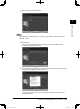
When you have finished selecting programs, click [Next].
9
Click [OK].
10
When the “Server Search” dialog appears, enter the IP address of the machine.
NOTE
Even if you do not know the machine’s IP address, you can find it by following these
steps.
(1) Click [Search].
The setup program will search for the IP address of the devices on the network.
After a few moments, any Muratec machines on the network will be displayed.
In Windows Vista and Windows XP Service Pack 2, “Windows Security Alert” dialog
will appear when clicking [Search]. In this case, click [Unblock] to continue search-
ing.
(Windows Vista) (Windows XP SP2)
(2) Select an IP address, then click [OK].
PC_Users_Guide.indb 16 2007/04/27 10:17:41