
User`s guide




6-17creatinG a Shared foLder
1
2
3
5
6
7
8
9
10
11
12
13
AI
troubLeShootinG
Windows XP Professional / Windows 2000
1
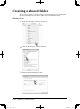
Right click the folder and select “Properties”.
2
Click the “Sharing” tab, and select “Share this folder”.
If a screen other than the one listed below appears, refer to page 6-19.
3
Enter a name for the folder.
PC_Users_Guide.indb 17 2007/04/27 10:18:21