
User`s guide




6-14 creatinG a Shared foLder
6
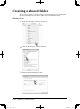
Close the “Network and Sharing Center” dialog box.
7
Select “Everyone (All users in this list)” from the list, and click [Add].
8
Change the “Permission Level” to “Co-owner”.
9
Click [Share].
10
Click [Done].
11
Click the “Sharing” tab, and select [Advanced Sharing...].
PC_Users_Guide.indb 14 2007/04/27 10:18:19