
User`s guide






6-6 windowS oPeration errorS
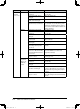
Phenomenon Device to check Check point Countermeasure
Received fax
documents
are not
forwarded.
PC Check if the forwarding
condition settings of received
documents are correct.
Set the correct forwarding condition in
the “Received fax forwarding setting”
dialog box of OfficeBridge Admin Tools.
Machine Check if the power is ON. Turn ON the power.
Forwarded
documents
are not print-
ing.
PC Check if the print setting of
forwarded documents is ON.
Set the print setting for forwarded docu-
ments in the “Received fax forwarding
setting” dialog box of
OfficeBridge Admin
Tools.
Machine Check if the power is ON. Turn ON the power.
Scanned
documents
are not
forwarded.
PC Check to make sure you’ve
selected the correct user
from the control panel.
Select a correct user.
Cannot
import a
scanned
document
into the
application
software.
PC Check if “Muratec OB
TWAIN Connector” is
installed.
If “Muratec OB TWAIN Connector”
is not installed, you cannot import a
scanned document in the application
software. Exit OfficeBridge and install
“Muratec OB TWAIN Connector”.
Check if “Muratec OB
TWAIN Connector” is set as
import device.
Set the import application software to
“Muratec OB TWAIN Connector”.
PC_Users_Guide.indb 6 2007/04/27 10:18:15