
User`s guide






6-3windowS oPeration errorS
1
2
3
5
6
7
8
9
10
11
12
13
AI
troubLeShootinG
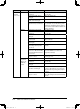
Phenomenon Device to check Check point Countermeasure
A table size,
character
pitch, or line
pitch on the
displayed
window is
different
from ones in
the manual.
PC Check if the specified
browser is used.
Use Internet Explorer 5.0.1 or later, or
Netscape Navigator 7.0 or later as your
browser. If you use an older version of the
browser, we recommend installing the
latest version.
A character
size on the
displayed
window is
different
from one in
the manual.
PC Check to make sure the
character size has not been
changed.
Adjust the character size in the character
size setting on the browser.
Unable to
open the
resident web
page which
you can
access from
the browser.
Network
peripheral
devices (ex.
LAN hub,
router)
The LAN cable is not con-
nected firmly.
Check whether the LAN cable is firmly
connected.
PC The Internet Explorer
security setting on Internet
Explorer 7.0 or later may
not be properly set.
Change the Internet Explorer security
setting. Refer to page 6-11.
Cannot open
a document
PC Check if an image viewer is
installed.
Without installing an image viewer, you
cannot view a document. Exit Office-
Bridge and install an image viewer. A
similar status may also occur with older
image viewers. Re-install the latest ver-
sion of an image viewer.
Check if you associate the
extension (TIFF or PDF)
with an image file in your
OS.
Refer to the OS operation manual of your
PC, and associate the extension.
Check if a plug-in applica-
tion is installed.
Check if a plug-in application includ-
ing QuickTime or RealOne, or an image
viewer is installed. If installed, associate
the extension with an image file.
The Internet Explorer
security setting on Internet
Explorer 7.0 or later may
not be properly set.
Change the Internet Explorer security
setting. Refer to page 6-11.
PC_Users_Guide.indb 3 2007/04/27 10:18:15