
User`s guide






6-2 windowS oPeration errorS
Windows Operation errors
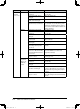
Phenomenon Device to check Check point Countermeasure
Cannot
connect to
OfficeBridge.
PC Check if the OfficeBridge IP
address is entered correctly.
Check the OfficeBridge IP address and
make sure it has been entered correctly.
Check if the OfficeBridge
network settings are correct.
Refer to Chapter 1 “TCP/IP settings” on
page 1-5 and configure the network set-
tings correctly.
Check if the browser set-
tings are correct.
Check the browser settings by following
these steps:
· Go to “Tools” on the menu bar −
“Internet Options” − “Connections” tab
− “Local Area Network (LAN) settings
Explorer”, and press the [LAN Settings]
button to check the proxy server set-
tings.
Check if the LAN cable is
connected.
Check the LAN cable connection and con-
nect correctly.
Check if the LAN cable is
damaged.
Replace the LAN cable.
Check if the network card
(LAN card) is damaged.
Replace the network card.
Check to make sure that the
system memory is sufficient.
· Make sure you have the required
memory space available on your PC. If
not, please add memory.
· If multiple software applications or
unnecessary resident software are run-
ning, exit them.
Check if the user informa-
tion is registered.
Register the user information in the “User
Set-up” dialog box of OfficeBridge.
Check if the correct pass-
word is entered.
Enter the password registered in the
“User Set-up” dialog box of OfficeBridge.
Machine Check if the power is ON. Turn ON the power.
Check if the LAN cable is
connected.
Check the LAN cable connection and con-
nect correctly.
Check if the LAN cable is
damaged.
Replace the LAN cable.
Check if the network set-
tings are correct.
Configure the network settings cor-
rectly (refer to page 1-5).
Network
peripheral
devices (ex.
LAN hub,
router)
Check if the power is ON. Turn ON the power.
Check if the LAN cable is
connected.
Check the LAN cable connection and con-
nect correctly.
Check if the LAN cable is
damaged.
Replace the LAN cable.
Check if the network periph-
eral device is damaged.
Connect the LAN cable to another port on the
device and make sure it operates correctly. If
it fails to operate, please replace the device
.
Check if the network set-
tings are correct.
Refer to the operational manual of the
device and configure the network settings
correctly.
PC_Users_Guide.indb 2 2007/04/27 10:18:14