
User`s guide




5-11Muratec ob docuMent downLoad ManaGer
1
2
3
4
5
6
7
8
9
10
11
12
13
AI
uSinG the utiLity ProGraMS
Download setting
Save in
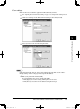
Set where to save your downloaded files.
1
See “Opening the environment setting” on page 5-8 and open the setting screen.
2
Click “Download”.
3
To change the location of the folder, click [Browse...].
4
Select your desired folder, and click [OK].
5
Click [OK].
• Click [Apply] to save the setting and keep the screen active.
• Click [Close] to close the screen without saving the changes.
PC_Users_Guide.indb 11 2007/04/27 10:18:09