
User`s guide





4-34 network confiGuration
SMTP/POP server settings
This sets the e-mail sending/receiving environment.
1
Open the “Admin Tools” screen. (see page 4-4)
2
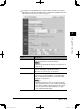
Click [SMTP/POP].
The “SMTP/POP Settings” dialog will appear.
Items Descriptions
Sender
Information
Name Enter the name that is displayed in the sender
field (“From” field) when sending e-mail.
Up to 40 characters can be registered.
E-mail Address Enter the e-mail address that is assigned to
your machine.
Up to 50 characters can be registered.
Reply To If you want the “Reply to:” address to be dif-
ferent than the address entered in the “E-mail
Address” field, enter the address here.
The address will be added to the header
attached with “Reply To:”.
Up to 50 characters can be registered.
NOTE
• This field can be entered, only when the “E-
mail Address” field has been entered.
PC_Users_Guide.indb 34 2007/04/27 10:18:02