
User`s guide





4-33network confiGuration
1
2
3
4
5
6
7
8
9
10
11
12
13
AI
uSinG the adMin tooLS
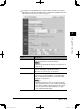
Items Descriptions
Client Port No. Select the UDP port number used for automatically
searching “OfficeBridge” when installing the “OfficeBri-
dge” printer.
Normally, set to “60000”.
InfoMonitor Port No. Select the UDP port number used when “OfficeBridge”
sends notification of newly arrived faxes etc. to “Info-
Monitor”.
Normally, set to “61000”.
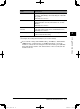
Scan to Print Monitor
Port No.
To use the “Scan to Print Monitor” function, enter the
same port number with “Scan to Print Monitor” here.
Normally, set to “62000”.
[Initialize] Initializes the TCP/IP settings. The settings will return
to the factory default setting.
3
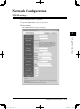
Configure the settings, then click [Save] to save the settings.
4
If you entered or changed the “DHCP Setting”, “IP Address”, “Subnet Mask”,
“HTTP Port No.”, “Client Port No.” or “InfoMonitor Port No.”, reboot the
machine to activate the new settings. To reboot the machine, press [OB Shut-
down] and turn the machine “Off” and after three or more seconds, turn the
machine back “On”.
PC_Users_Guide.indb 33 2007/04/27 10:18:02