
User`s guide





4-30 SetuP
Bulletin Board
You can set the default Bulletin Board settings.
1
Open the “Admin Tools” screen. (see page 4-4)
2
Click [Bulletin Board].
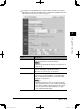
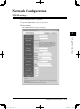
The “Bulletin Board Settings” dialog will appear.
Items Descriptions
Document Posting
Time Limit
Select the retention period of the documents posted on
the “Bulletin Board”.
To post indefinitely, check “Do not delete automatically”.
To delete after a certain retention period, check “Delete
automatically” and specify the preservation period to
from 1 to 99 days.
NOTE
• The retention period does not include the present
day. So if you select one day, the document would be
deleted at 12:01 a.m. the day after tomorrow.
The default setting is “Do not delete automatically”.
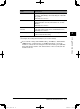
Original Document Select whether or not to delete the document automati-
cally from its original tab when it is posted to the “Bul-
letin Board” tab.
Delete Document Select whether the administrator, in addition to the
poster, can delete the posted documents. To enable this,
check “The administrator can delete the document(s)”.
[Save] Saves the current settings and closes the dialog.
[Close] Closes the “Bulletin Board Settings” dialog.
3
Adjust the setting and select [Save] to register them.
PC_Users_Guide.indb 30 2007/04/27 10:18:01