
User`s guide





4-29SetuP
1
2
3
4
5
6
7
8
9
10
11
12
13
AI
uSinG the adMin tooLS
Public Inbox
You can set the initial Public Inbox settings.
1
Open the “Admin Tools” screen. (see page 4-4)
2
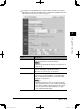
Click [Public Inbox Settings].
The “Public Inbox Settings” dialog will appear.
Items Descriptions
Settings Select whether to enable the use of the “Public Inbox”
function.
When it is set to “Off”, the “Public Inbox” tab disappears
and the “Public Inbox” function will be disabled.
Document Hold Time Select the retention period of documents received in the
“Public Inbox”.
To hold indefinitely, check “Do not delete automatically”.
To delete the documents after a certain retention period,
check “Delete automatically” and specify the preserva-
tion period to from 1 to 99 days.
NOTE
• The retention period does not include the present
day. So if you select one day, the document would be
deleted at 12:01 a.m. the day after tomorrow.
The default setting is “Do not delete automatically”.
Delete Document Select whether or not administrator authorization is
required to delete documents in the “Public Inbox”.
When “Administrator password required” is checked,
only the administrator can delete document from the
“Public Inbox” tab.
[Save] Saves the current settings and closes the dialog.
[Close] Closes the “Public Inbox Settings” dialog.
3
Adjust the setting and select [Save] to register them.
PC_Users_Guide.indb 29 2007/04/27 10:18:01