
User`s guide





4-25SetuP
1
2
3
4
5
6
7
8
9
10
11
12
13
AI
uSinG the adMin tooLS
3
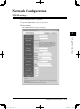
To register a new distribution rule, click the number that does not contain a
distribution rule. To edit a distribution rule, click the desired distribution rule.
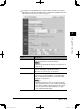
The “Fax Forwarding Setting” dialog will appear.
Items Descriptions
Setting Select whether to enable the setting you have config-
ured. Check this box to enable the setting.
NOTE
• When this is disabled, the settings are invalid even if
they are set.
Setting Name When making multiple distribution settings, this sets a
name for identifying a distribution setting.
The name can contain up to 30 characters.
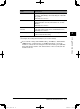
Forwarding Conditions Select the forwarding check box.
If you want to allow forwarding to a specified sender
only; (1) click [Specify Sender(s)], (2) enter the detail
conditions, (3) click [Save].
NOTE
• When the machine receives an e-mail that contains
the forwarding request to a fax, it will be handled by
the setting of “When mail that requests fax forward-
ing is received” on the “E-mail Settings” (see page
4-37) rather than this setting.
PC_Users_Guide.indb 25 2007/04/27 10:18:00