
Specifications






1-35
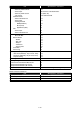
Print Job
Item Specifications / Comments
Job Display/Operation Method yes (Browser)
(Note) The security print job can be viewed only by
the initiated user.
Job Details Display yes
・Document Name
yes
・Status
no
・User Name
yes (Windows User Name)
・User Group Name
no
・Progress
yes
・Print Time
yes
Job Cancel yes (Control panel/Browser)
Available only for the jobs in the Is memory.
Job order change no
Tabulation of Print Counter by user group yes, in User Access & Control screen
Tabulation of Print Counter by user yes, in User Access & Control screen
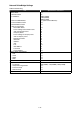
Fax Communication Log
Item Specifications / Comments
Fax Communication Log Display yes (Control panel/Browser)
# of Log Latest 100 communications (Tx + Rx)
Items on the Communication Log
・Destination
yes
・# of Pages
yes
・Comm. Mode
yes
・Comm. Time
yes
・Date&Time
yes
・Result
yes
・Details
Error Code
yes
Broadcast Locations
yes
Comm. Log Auto Print yes (Control panel)
Comm. Log Manual Print yes (Control panel/Browser)
Tabulation of Comm. Log by user group no
Tabulation of Comm. Log by user no
Storage of communications yes, by Archiving Settings (to folder).
(Note) Comm. Result cannot be stored in the Ar-
chiving Function.
Download of Stored Comm. Log yes, CSV format